Signing up on DM Play is quick. The form has four boxes and a tick-box. Most problems people run into come later, when the number they used is switched off, or the password is one they cannot remember, or the bank name does not match. So this guide covers the form itself and also the few choices at sign-up that save you trouble afterwards.
What You Need Before You Start
- An Indian mobile number that is active and in your own name. It becomes your username.
- A new password of at least six characters. Do not reuse your email or UPI password.
- The official DM Play link. If someone sent you a referral link, it will carry their invite code.
- You must be 18 or older. DM Play states this on its home screen.
DM Play Register: Step by Step
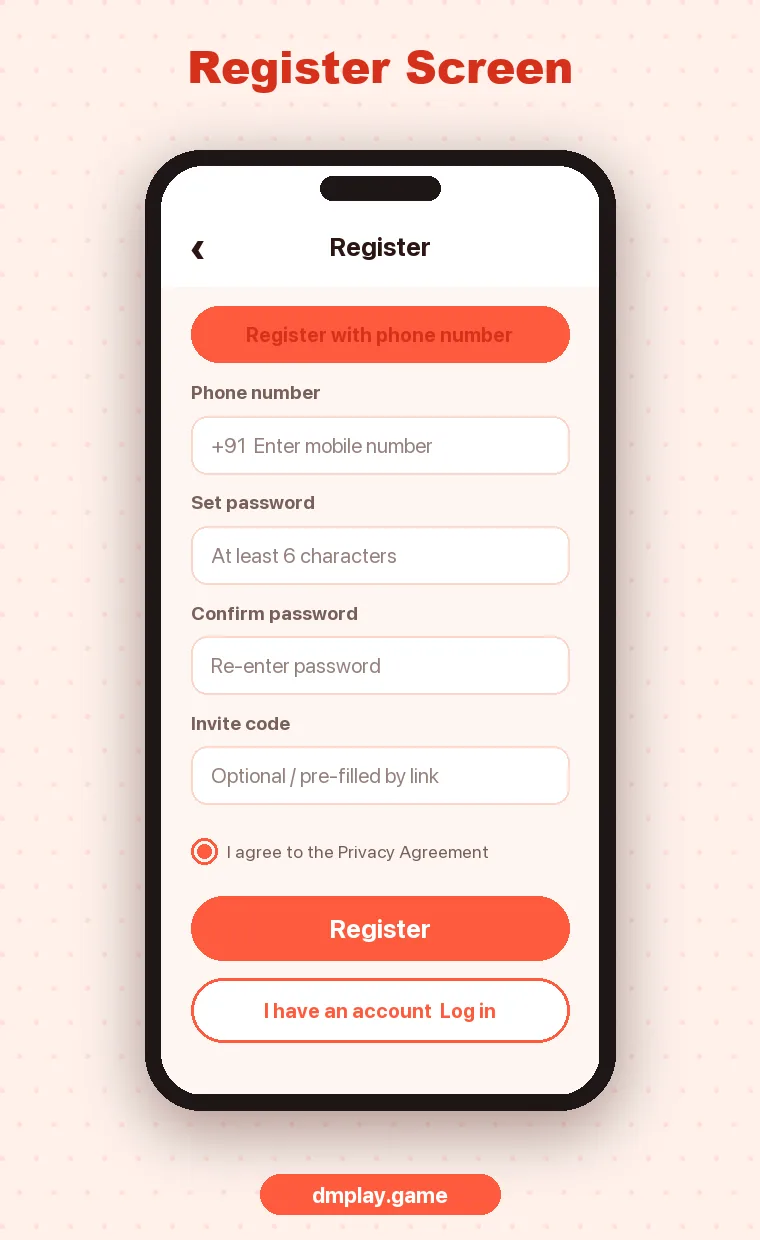
- Open DM Play in Chrome, or open the app if you already installed it.
- Tap the orange Register button at the top right.
- On the phone tab, check that the country code says +91 and type your 10-digit number with no spaces or leading zero.
- Type a password in Set password, then the same one in Confirm password.
- Look at the invite code box. If you came from a link, it is already filled. Leave it alone. If it is empty and a friend gave you a code, type it now, because it usually cannot be added after the account is created.
- Tick the privacy agreement.
- Tap Register. You are logged in and taken to the home screen.
That is all there is to it. There is no long KYC form at this stage. Your bank details are added later, from the withdraw section, when you actually want to take money out.
Phone or Email: Which Should You Use?
DM Play’s login screen has a Phone Number tab and an Email tab. A phone number is the simpler choice for most people in India, since it is what support asks for and it is harder to forget. If you do use email, use one you actually check, because that is where any reset messages would go.
Does the Invite Code Matter?
For you as a player, the invite code mostly decides who gets credited for bringing you in. It links your account to the person or agent who shared the link. It does not change the games or your odds. Some invite events give the new player a small reward too, so check the Activity tab after you join. If you were not invited by anyone, leaving it empty is fine.
Common DM Play Sign-Up Problems
| Problem | What it usually means | What to do |
|---|---|---|
| “Phone number already registered” | An account already exists on that number | Use Log in and reset the password if needed |
| Register button does nothing | A box is empty or the agreement is not ticked | Fill every field and tick the box |
| Passwords do not match | A typo in one of the two boxes | Type both again slowly, or tap the eye icon to check |
| Invite code missing | You opened the site directly, not from the link | Open the original link again before registering |
| Page will not load | Weak network or a blocked mirror | Switch Wi-Fi or mobile data, and make sure the link is official |
After You Register
Before you deposit anything, spend five minutes looking around:
- Open Account and note your UID. Support will ask for it.
- Open Activity and read the first deposit rules, so you know what you are agreeing to if you take that bonus.
- Open a game like WinGo and tap How to play to see the payout rules.
- Decide on a limit for the week and stick to it.
When you are ready, our deposit and withdrawal guide explains the payment side, and DM Play Login covers signing back in on a new phone.
FAQ
Is DM Play registration free?
Yes. Creating an account costs nothing. You only spend money when you choose to deposit.
Can I make two DM Play accounts?
Platforms like DM Play usually allow one account per person, number and bank account. Extra accounts made for bonuses are a common reason for accounts being restricted.
Can I change my registered phone number later?
Not from a simple settings screen in most cases. You would have to ask customer service, so register with a number you plan to keep.
I forgot to enter the invite code. Can I add it now?
Usually not. The code is tied to the account when it is created.