Logging in to DM Play takes a few seconds when everything works. When it does not, it is usually one of three things: the wrong tab, the wrong password, or too many attempts. Here is how to handle each one.
DM Play Login Steps
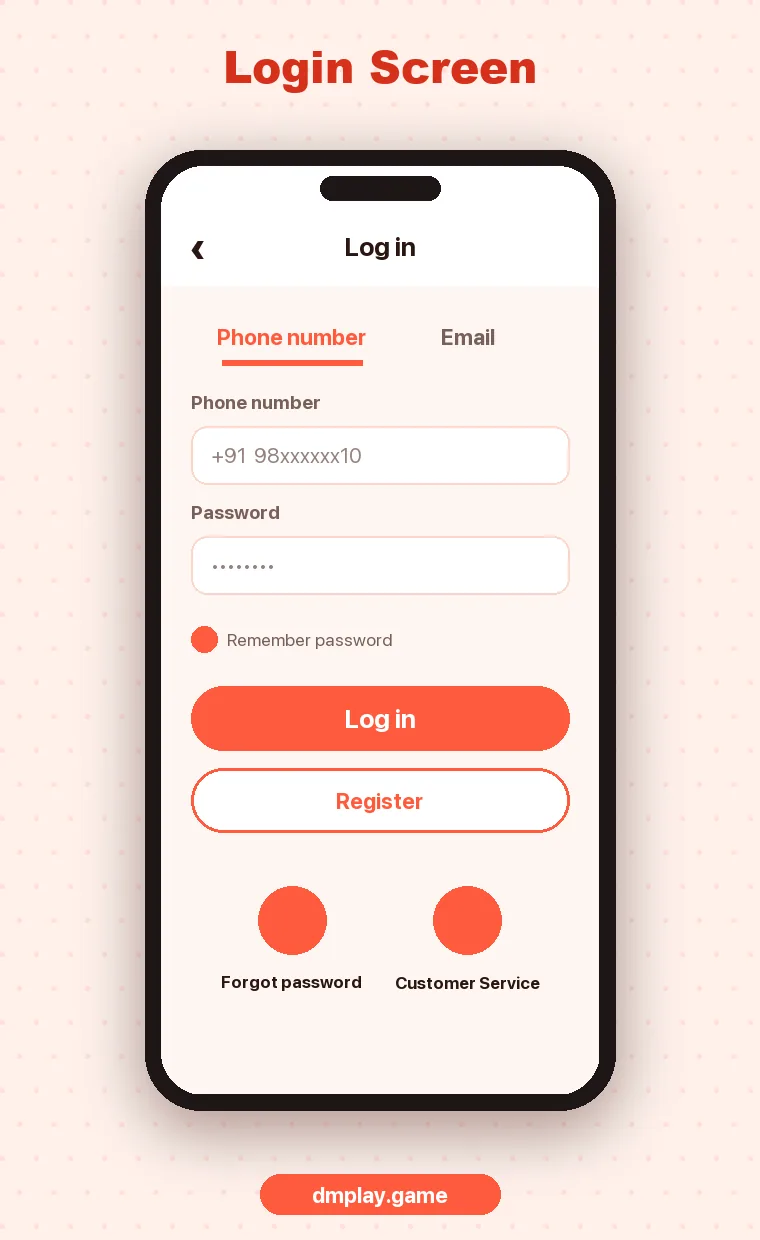
- Open DM Play and tap Log in at the top right.
- Pick the tab you registered with: Phone Number (most people) or Email.
- For phone, check the country code shows +91 India and type your 10-digit number.
- Type your password.
- Tick Remember password only if it is your own phone and it is locked.
- Tap Log in.
Forgot Your DM Play Password?
- On the login screen, tap Forgot password?
- Follow the steps to verify your registered number or email.
- Set a new password you have not used anywhere else.
- Log in with the new password.
The login page also says that if you forget your password you can contact customer service. That is the fallback if the reset does not work, for example if you no longer have the SIM.
“Account Has Been Locked”
DM Play locks an account after more than 10 wrong password attempts. The message reads, in short: “You have entered wrong password more than 10 times. Please use Forgot Password to change new password for unlock and log in.”
So the fix is not to keep trying. Use Forgot password? to set a new one, and the account unlocks. If you cannot complete the reset, choose Contact customer service on that screen.
Common DM Play Login Problems
| Problem | What to check |
|---|---|
| “Account does not exist” | You may be on the Email tab, or you registered with a different number |
| “Wrong password” | Caps lock, autofill entering an old password, or an extra space |
| Page keeps loading | Switch between Wi-Fi and mobile data, clear Chrome’s cache, or try the app |
| Logged out again and again | Private or incognito mode, or a browser that clears cookies |
| Login page looks different | Stop and check the link. See official website |
Logging In on a New Phone
Install the app or open the site, then log in with the same number and password. Your balance, history and bank account are tied to your account, not to the phone. If you used “Remember password” on the old phone, log out there if you can.
Keeping Your DM Play Account Safe
- Use a password you do not use anywhere else.
- Never share your password, even with an agent or “support”.
- Do not log in through links sent in chats.
- Log out on shared or borrowed phones.
FAQ
Can I log in to DM Play with my email?
Yes, if you registered with an email. Use the Email tab on the login screen.
How do I unlock my DM Play account?
Use Forgot password to set a new password. A locked account unlocks once the password is changed.
Can I be logged in on two phones?
It may be possible, but for security it is better to use one device and log out of any others.